Use Google Scholar better
May 9, 2025

If you link Google Scholar to Massey Library, you get free access to the articles we have subscriptions for, instead of being asked to pay.
We strongly recommend you take these steps to get as much full text access as possible:
- Go directly to Google Scholar or use the Google Scholar link from a Library web page.
- If you see ezproxy.massey.ac.nz as part of the URL/address, you could get error messages. You may need to clear your cache, update bookmarks or take care with getting the correct URL https://scholar.google.com/ the first couple of times.
- Link to Massey Library. This will give you access to our subscribed articles through Google Scholar results. There are two ways to do this:
- Install the LibKey Nomad extension in your browser. This is the preferred method, as it links you to Massey, tries to find the article for you from a range of sources, and works on many other sites including Google. Get LibKey Nomad.
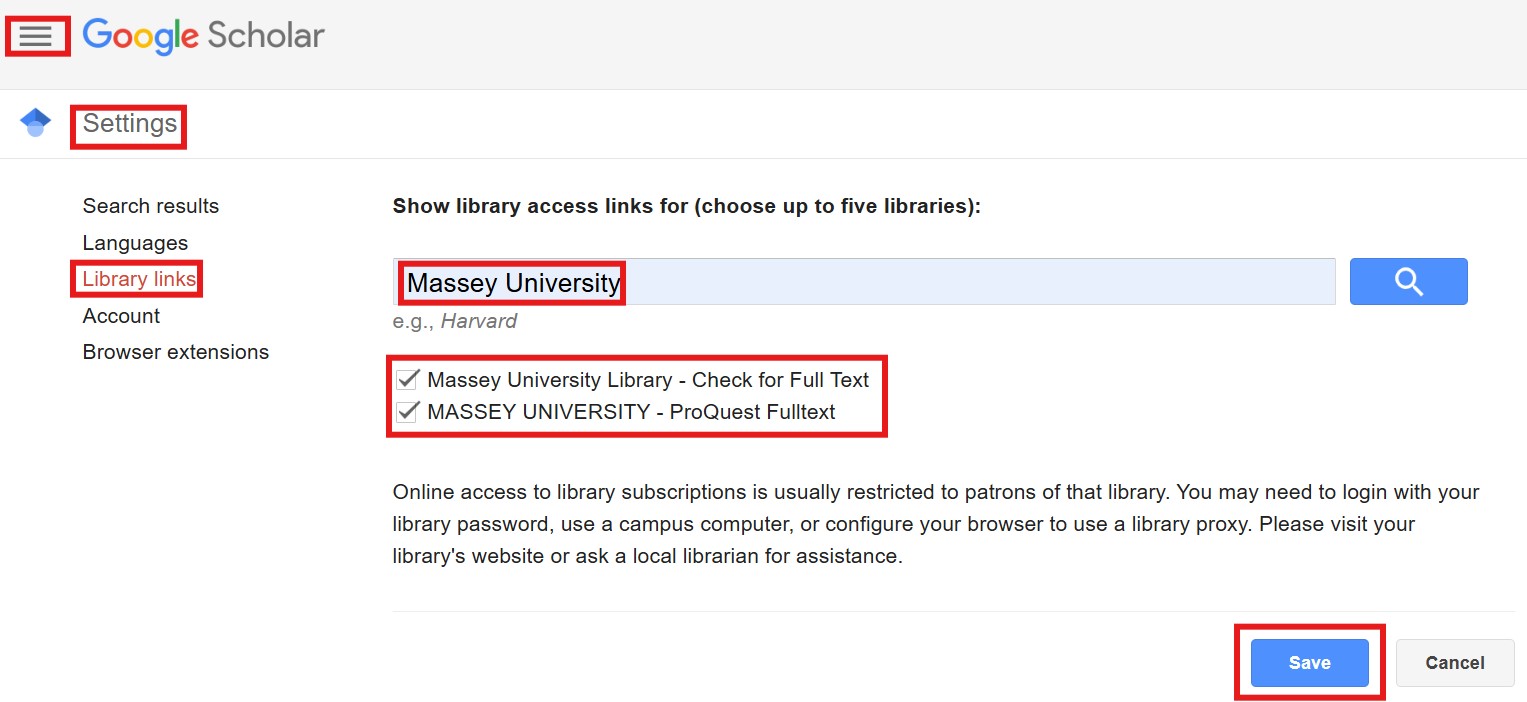
- Or go to the ‘hamburger’ icon at top left of Google Scholar and select ‘Settings’. Click on ‘Library links’. Search for Massey and tick the box next to ‘Massey University Library – Check for Full Text’. Click Save.
- Sign in to your Google account if you have one. Signing in gives extra full text access. There are two ways to do this:
- Sign in to Google in your usual way, in the browser you are using for Google Scholar.
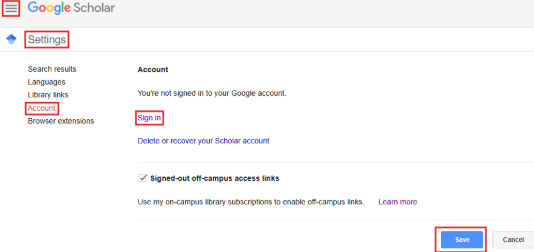
- Or go to the ‘hamburger’ icon at top left of Google Scholar and select ‘Settings’. Click on ‘Account’. Click on ‘Sign in’ and follow the prompts. Click Save. Do this in each browser you use for Google Scholar.
If you would like help please email library@massey.ac.nz.


Search posts
Categories
Tags
Albany
archives
catalogue
databases
Discover
distance
ebooks
EndNote
etv
exams
feedback
Google Scholar
IT
KMIR
kupu
kupu maori
Kupu o te wiki
language
Manawatū
Maori
maori kupu kotahi te kupu reo
maori kupu wiki reo
Maori staff
microsoft
MRO
māori kupu
open access
referencing
reo
research
scholarly journals
Scopus
social work
Stream
subject guides
surveys
Te Kupu
te reo
te reo Māori
te wiki o te reo
theses
training
Turitea
Wellington
wiki
Recent Comments
- October 2026
- September 2026
- June 2026
- May 2026
- January 2026
- November 2025
- September 2025
- May 2025
- April 2025
- March 2025
- February 2025
- January 2025
- December 2024
- November 2024
- October 2024
- September 2024
- August 2024
- July 2024
- June 2024
- May 2024
- December 2023
- November 2023
- October 2023
- September 2023
- June 2023
- May 2023
- February 2023
- January 2023
- November 2022
- October 2022
- September 2022
- August 2022
- July 2022
- June 2022
- May 2022
- March 2022
- January 2022
- November 2021
- August 2021
- July 2021
- May 2021
- April 2021
- March 2021
- December 2020
- November 2020
- September 2020
- August 2020
- June 2020
- May 2020
- April 2020
- March 2020
- February 2020
- November 2019
- October 2019
- September 2019
- July 2019
- June 2019
- May 2019
- March 2019
- February 2019
- December 2018
- November 2018
- October 2018
- September 2018
- August 2018
- July 2018
- June 2018
- May 2018
- April 2018
- March 2018
- February 2018
- January 2018
- December 2017
- November 2017
- October 2017
- September 2017
- August 2017
- July 2017
- June 2017
- May 2017
- April 2017
- March 2017
- February 2017
- January 2017
- December 2016
- November 2016
- October 2016
- September 2016
- August 2016
- July 2016
- June 2016
- May 2016
- April 2016
- March 2016
- February 2016
- January 2016
- December 2015
- November 2015
- October 2015
- September 2015
- August 2015
- July 2015
- June 2015
- May 2015
- April 2015
- March 2015
- February 2015
- January 2015
- December 2014
- November 2014
- October 2014
- September 2014
- August 2014
- July 2014
- June 2014
- May 2014
- April 2014
- March 2014
- February 2014
- January 2014
- December 2013
- November 2013
- October 2013
- September 2013
- August 2013
- July 2013
- June 2013
- May 2013
- April 2013
- March 2013
- February 2013
- January 2013
- December 2012
- November 2012
- October 2012
- September 2012
- August 2012
- July 2012
- June 2012
- May 2012
- September 2009
- November 2008

Leave a Reply